Offsite Replication, Instant Recovery.
Disaster recovery should be ready when you need it, not expensive every day you don't. KorGrid delivers offsite replication without the burden and cost of maintaining a secondary recovery site.
Protect Today
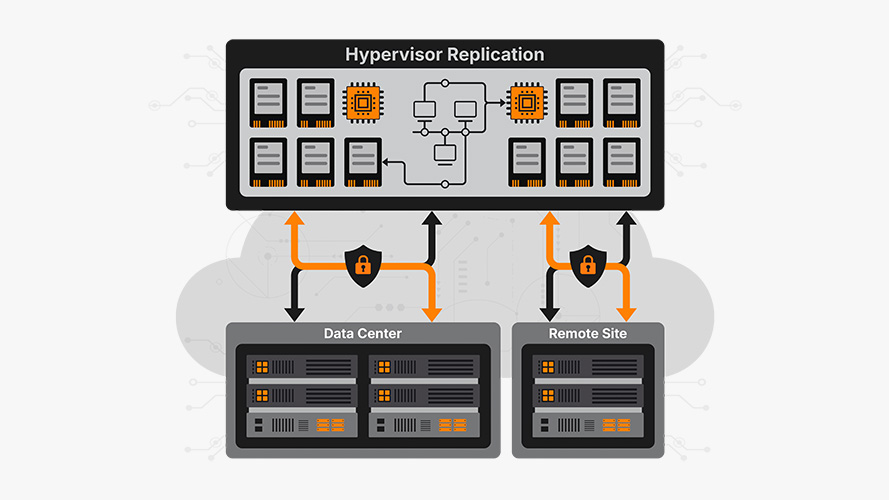
Replicate workloads offsite before an outage occurs. Using native hypervisor replication or compatible backup software, KorGrid becomes your recovery site.
Establish offsite protection without changing existing workflows or trusted tools.
Recover Tomorrow
When recovery becomes necessary, backup data can be brought online inside KorGrid. Our platform provides the infrastructure to get your systems back online.
Turn your backup data into a complete disaster recovery strategy.
Offsite Replication
Use native hypervisor replication or existing backup software with no workflow changes.
Transfer only changed data to reduce bandwidth and replication windows.
Bring backup data online inside a fully functional Virtual Data Center.
Your Infrastructure, Protected.
Native Replication

01 Continuous Protection
For supported hypervisor environments, native replication sends only changed data blocks to KorGrid, reducing WAN traffic while helping organizations maintain recovery readiness at all times.

02 Ready-to-Run Recovery
Recovery should be more than a theoretical plan. When a disaster recovery event strikes, KorGrid provides a path to activate your replicated data inside a fully functional Virtual Data Center.

03 Return To Normal
Bringing systems online is only part of the recovery journey. KorGrid helps organizations plan and execute the transition back to their primary environment once normal operations resume.
External Backup Platforms
01 Covers More Hypervisors
Organizations running Nutanix, Hyper-V, Proxmox, or other hypervisors can use compatible backup and replication tools to establish offsite protection without changing existing workflows.

02 Put Backups To Work
Backups are important, but recovery requires infrastructure. When needed, KorGrid can help import your backup data into a Virtual Data Center for migration, testing, or disaster recovery.

03 Keep Your Existing Tools
KorGrid works alongside your existing backup platforms and workflows, helping teams extend recovery capabilities without disrupting operations.
KorGrid lets you store, import, and run your backups.
Frequently Asked Questions

Native replication uses the hypervisor's built-in replication capabilities to send changed VM data directly into KorGrid. For VergeOS and VMware environments, this avoids the need for separate backup software in the replication path.
Only changed data is transferred, which helps reduce bandwidth usage and shorten replication windows. KorGrid also does not charge bandwidth fees for replication traffic in or out of the platform.
Backup software is used when the source hypervisor does not support native replication into KorGrid. This is the path for environments such as Hyper-V, Nutanix, Proxmox, Scale Computing, and other platforms supported by backup tools like Veeam.
With Veeam, a backup server can run inside KorGrid while the customer side handles the changed data processing and transfer. It keeps the workflow familiar while still placing recovery data near real infrastructure.

Yes. Replicated data can become usable virtual machines inside a KorGrid Virtual Data Center. That means your recovery copies are not just files sitting in storage somewhere.
You can boot workloads, validate applications, test updates, support audits, perform recovery drills, or operate from KorGrid during a real disaster recovery event. The platform is built with 100% NVMe storage, so performance matters when VMs need to run.

Traditional offsite storage gives you a place to keep data. KorGrid gives you a place to recover it. That distinction matters when the goal is getting systems running again, not just storing backup files.
Object storage, archive storage, and basic repositories can be useful, but they do not provide a complete recovery environment by themselves. KorGrid adds the compute, memory, networking, and operational support needed to turn protected data back into running workloads.

Yes. Recovery testing is one of the best use cases for Offsite Replication. You can bring protected workloads online in KorGrid to confirm that systems boot, applications behave correctly, and recovery plans are realistic.
Testing can be performed for disaster recovery drills, backup verification, compliance reviews, migration planning, or internal confidence. The goal is to know your recovery process works before the day you actually need it.

Yes. Offsite replication helps create recovery points outside the primary environment, which can be critical if production systems are encrypted, deleted, corrupted, or otherwise compromised.
KorGrid also adds another layer of protection on our side. Your replication into KorGrid becomes your offsite copy, and KorGrid replicates that protected data again outside our facility as an included additional copy.
No. KorGrid does not charge bandwidth fees for replication traffic into or out of our platform. Your replication costs stay predictable because you're not billed every time data moves.
Customers can replicate as often as their environment, software, and connection allow. Whether you are sending frequent native replication updates or using backup software to move changed data, KorGrid does not meter bandwidth.